Find every video of your track.
Even the ones that aren't out yet. IDReel listens to the videos on your iPhone and finds every clip your tracks play in.
- Unreleased IDs too
- No sign-up
- Recognition runs on your phone
6,404 videos in.465 with my tracks.
Measured on MOSKO's iPhone 15 Pro Max. Your library will differ.

I released a track on a Friday and couldn't find one video of it. So I built the thing I wanted.
You played it. Someone filmed it.
Release day, and you can't find one video of the track.
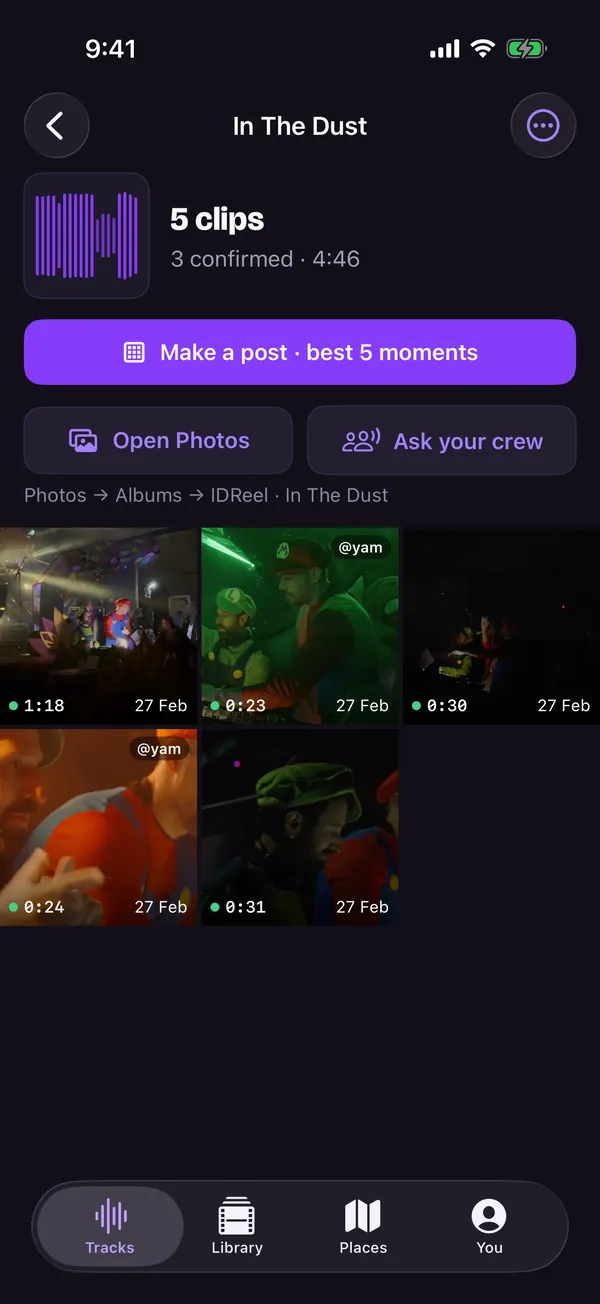
Tap the track. Every clip it plays in, sorted by night and place.
It's an ID. Nothing out there knows it.
IDReel matches your own files. A track that isn't out yet is found like any other.
Your mate filmed the good one.
Send a crew card. Their phone checks their videos. They choose what to send you.
Three steps.
One of them is slow.
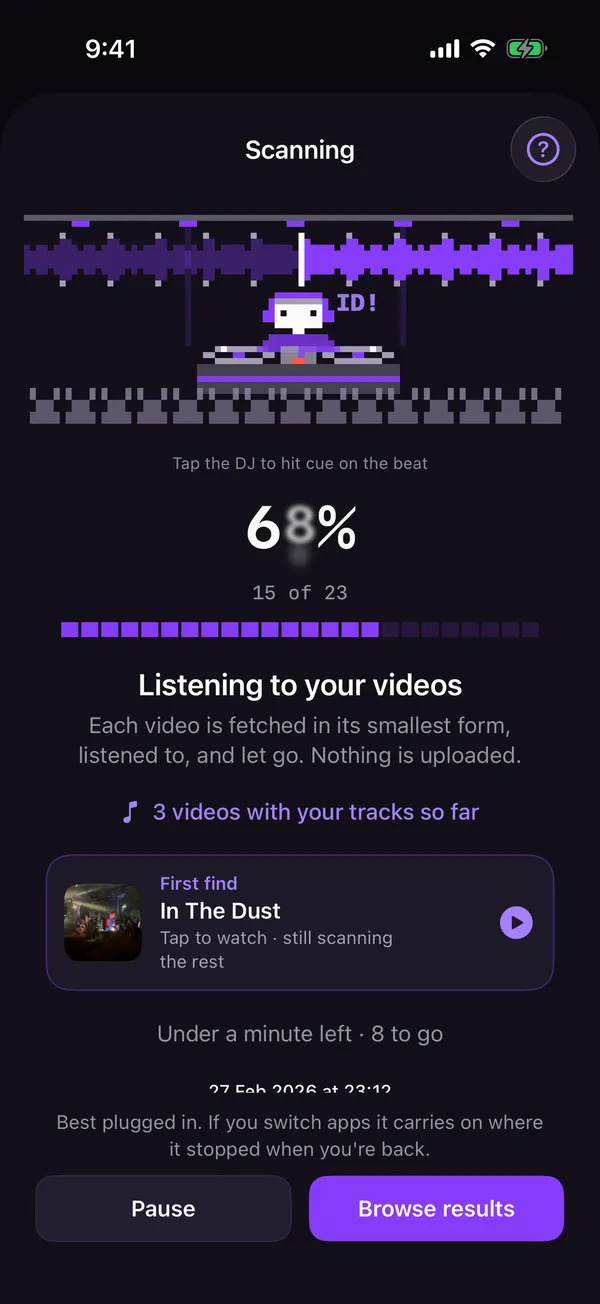
It starts with your last 90 days, so the first clips show up in minutes. The rest of a big library is one overnight scan, plugged in. After that, only new videos.
-
Drop in your tracks.
Masters, bounces, edits, IDs. From Files, Dropbox or AirDrop.
-
Scan once.
It listens to every video in Photos, Files and Dropbox, right on your iPhone.
-
Search forever.
Tap a track, get every clip. New tracks need no rescan.
Drop in your tracks. Scan once. Search forever.
Download on theApp StoreFound it. Now post it.
-
 Find
Yes, or Not it.
Each clip opens where your track comes in. One tap to confirm.
-
Sort
Every clip of every track.
Sorted by night and place, with an album in Photos for each track.
-
 Cut
Cut the moment.
Drag the 30 seconds you want. Shared at full quality.
-
 Post
One carousel.
Your best moments from different nights, 30 s each, lined up as one Instagram post. Caption included.
-
 Crew
Ask your crew.
Send friends one link. With IDReel on their phone, it checks their videos for your tracks. The clips come to you credited, full quality.
-
 Sources
Photos, Files, Dropbox.
From Dropbox it reads only the sound of each video, never the whole file, and never changes your Dropbox.
Scanning is free. Your first 3 clips too.IDReel Pro opens every clip: 14 days free, then $99.99 a year. No sign-up.
Download on theApp StoreRecognition runs on your phone.
IDReel never uploads your videos or your music.
Listens on the phone
No sign-up
Videos and music never uploaded
IDReel for Mac.
Your whole catalog against every video you have.
- Your masters, by release
- Footage folders, drives, Photos and Dropbox
- Yes or not it with one key, then export the clips or a report for the label
macOS 14 or later · Apple silicon and Intel

Is it free?
The download is free, and so are scanning, every count and your first 3 clips. IDReel Pro opens every clip, new footage as it lands, posts, albums, export and crew cards: 14 days free, then $99.99 a year, or $299.99 once, for good. Cancel any time in Settings. Everything IDReel found for you before Pro stays open, and answering a friend's crew card is always free. Prices are in US dollars; the App Store shows yours.
Does it find unreleased tracks?
Yes. It matches your own files: masters, bounces, edits, IDs. No public database needed, so a track that isn't out yet is found like any other.
Does it upload my videos or my music?
No. Recognition runs on your phone. IDReel never uploads your videos or your music. The details are in the privacy policy.
Where can my videos be?
In Photos (iCloud too), in folders in Files, and in Dropbox. From Dropbox it reads only the sound of each video, never the whole file.
How long does the first scan take?
It starts with your last 90 days, so the first clips show up in minutes. The rest depends on your library: on MOSKO's iPhone, about 6,000 videos took about 6 hours, plugged in overnight. After that, only new videos are scanned, and a new track takes minutes.
I play my tracks pitched up. Does it still work?
Yes, within limits. Faster, slower and key lock all work. A track played more than about 12% faster or slower can be missed: add the version you play out.
My friend filmed it. Can IDReel find it?
Yes, with a crew card. Send your friend one link. With IDReel on their phone, it checks their videos for your tracks, and they choose which clips to send you. Sending a card comes with IDReel Pro; answering one is always free.
Which tracks and phones work?
MP3, WAV, AIFF, FLAC and M4A, from Files, Dropbox or AirDrop, or sent from IDReel for Mac. IDReel runs on iPhone with iOS 17 or later.
Is there a Mac version?
Yes, a beta: IDReel for Mac checks your whole catalog against your footage folders, drives, Photos and Dropbox. Get the Mac beta.
Find your sound in the crowd.
Free to download for iPhone. Your first clips in minutes.